

Managing translation files in a growing web app is the kind of small chore
that silently eats hours every sprint: a designer changes one English
string, you fan out to ten locale/*.json files, miss one, ship
a fallback to English, and a user in Frankfurt sends an angry screenshot.
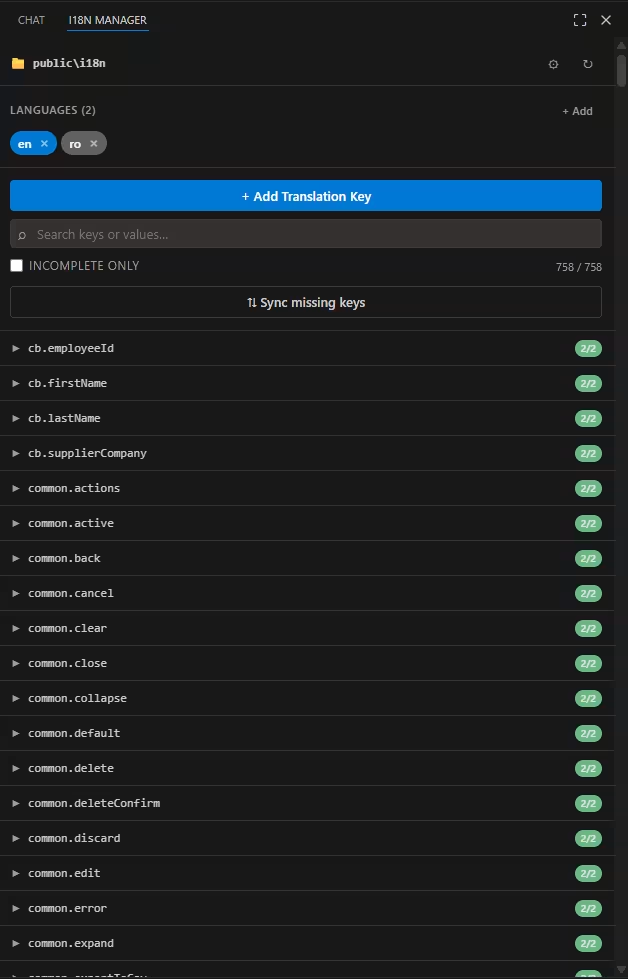
LocaleSync: i18n Data Manager is a free, open-source VS
Code extension I built to fix exactly that workflow add keys to every
language at once, spot missing translations at a glance, and translate
strings with GitHub Copilot or any other VS Code language model, all from a
sidebar that lives next to your code.
Why a sidebar instead of yet another CLI?
Most i18n tooling falls into two camps. On one side you have heavy SaaS platforms: powerful, but they pull your strings out of git, add a billing seat per teammate, and force a separate review surface. On the other side you have CLI scripts that lint missing keys fine for CI, awful for the flow of actually writing a feature, where you constantly bounce between an English source file and four siblings.
What I wanted was something closer to how a Postman tab feels next to a
backend project: a docked panel that always reflects the current state of my
locales/ folder, lets me add a key once and have it land in
every file, and uses the language model I'm already paying for
(Copilot) to fill in the rest. No new account, no extra ad-hoc scripts, no
mental tax.
I write quite a bit about the developer-side of running a content site (see how AdSense interacts with site performance and how I prepare a site for AdSense approval), and one consistent theme is that localised content reads as more trustworthy to both humans and ranking systems. A clean i18n pipeline is part of that quality bar not a nice-to-have you bolt on after launch.
Install & first run
- Install the extension from the VS Code Marketplace (the source lives on GitHub).
- Open a project that already has translation files anything that looks like the layout below works, both flat and nested JSON.
- Click the 🌐 i18n Data Manager icon in the activity bar and pick your translations folder. The path is saved per workspace, so each repo keeps its own config.
locales/
├── en.json
├── fr.json
├── es.json
└── de-DE.json
Either of these JSON shapes is fine LocaleSync flattens nested objects to
dot-notation (common.buttons.submit) in the UI and re-nests
them on write, preserving your existing structure:
// flat
{ "common.buttons.submit": "Submit" }

// nested stored exactly the same way on disk
{
  "common": {
    "buttons": { "submit": "Submit" }
  }
}
The feature tour
One key, every language
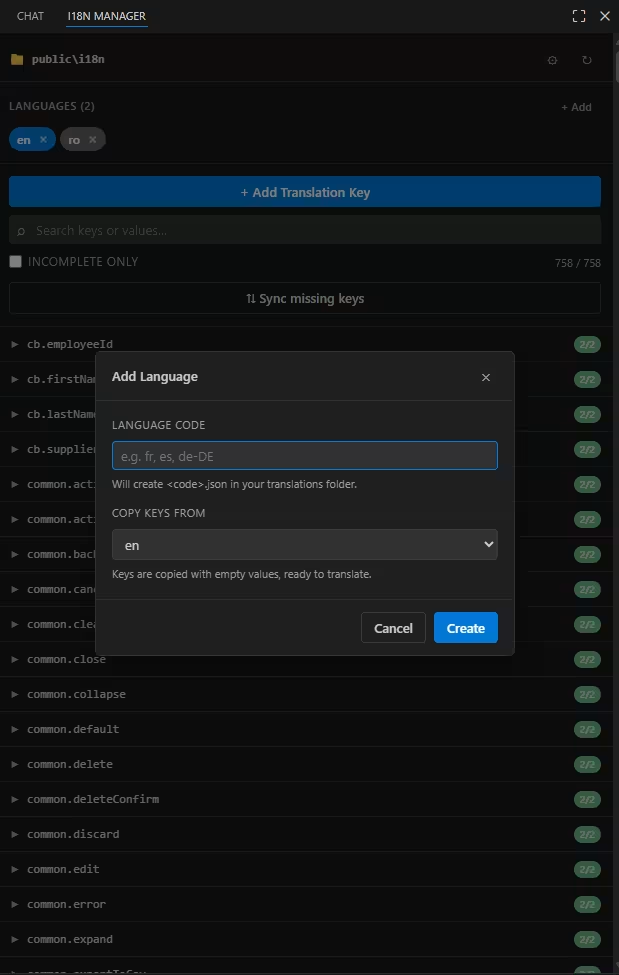
The most basic operation is also the one I do twenty times a day. Click
+ Add Translation Key, type a dot-notation key, fill in as many
values as you want, and the extension writes to every *.json
file in the folder simultaneously empty placeholders included for the
languages you skipped, so nothing falls out of sync.
Inline editing with auto-save
Expand any key and you get a textarea per language, sized to the value. Edits save on blur or with Ctrl/Cmd+Enter; Esc reverts. There is no "save all" button to forget.
Search that actually works
The search box matches both keys and values across every language. Hunting down a string a stakeholder pasted into Slack ("we say 'Are you sure?' somewhere, where is it?") becomes a one-second job instead of a four-tab grep session.
Incomplete-only filter & sync
Toggle Incomplete only to surface every key missing in any language. ⇅ Sync missing keys fills the gaps with empty placeholders so all files share the same shape perfect right before a release when you want to hand the empties off to translators.
AI translation, batched and safe
LocaleSync uses the official VS Code Language Model API. That means it talks to whichever provider you have installed and signed in with typically GitHub Copilot, but Claude, Gemini and others all plug into the same surface (I compared the experience of the major providers in Which AI agent deserves your $20?). The extension never ships an API key, never makes you sign in to a third party, and asks your consent on the very first call.
Three translation modes
- Per-language ✨ next to each value: pick a source language and translate just that one cell.
- ✨ Translate all on a key: translate that single key into every other language in one click. If targets already have a value you choose to overwrite or only fill empties.
-
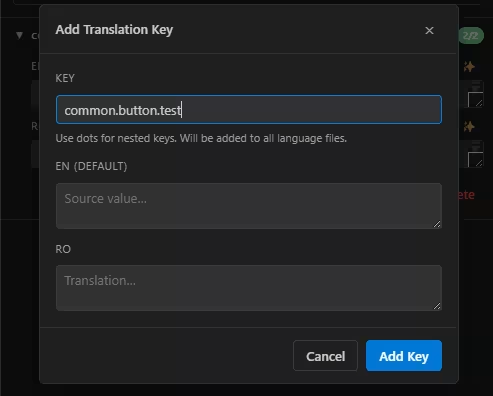
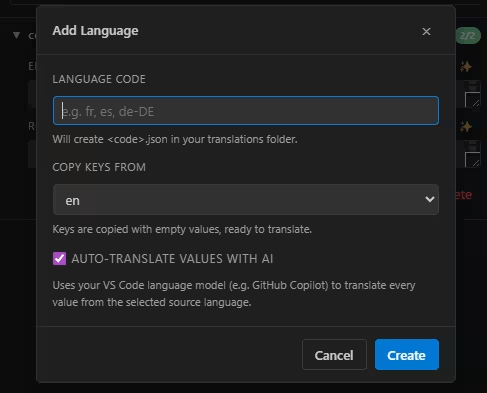
Auto-translate on new language file: when you add
de.jsonwith the checkbox ticked, every key is translated from your source language right after the file is created.
Why batching matters
A naive implementation sends one prompt per key. For a 600-key dictionary that's 600 round-trips, several minutes of waiting, and a very real chance of throttling. LocaleSync chunks values into batches (~50 keys / ~6,000 characters per request) and sends each batch as a single JSON object with anonymised IDs so dotted keys can't collide. The model returns a JSON object you parse in one go. Same job orders of magnitude fewer round-trips.
If a batch reply is malformed (rare, but it happens), the affected entries automatically fall back to per-key translation so a single bad response never aborts the run. Cancelling is honoured between batches, and you get a summary toast: translated N · skipped M · failed K.
The prompt does the boring guarding for you
The translation prompt is locked down to preserve everything you don't want a model to "improve":
-
Placeholders:
{name},{{count}},%s,%d,$1,:param. - HTML tags, attributes and entities.
-
ICU MessageFormat (
plural,select,selectordinal). - Leading / trailing whitespace and line breaks.
Reviewing machine output remains your job especially for short, ambiguous
strings but you won't find a stray %s renamed to
%cadena in your Spanish file.
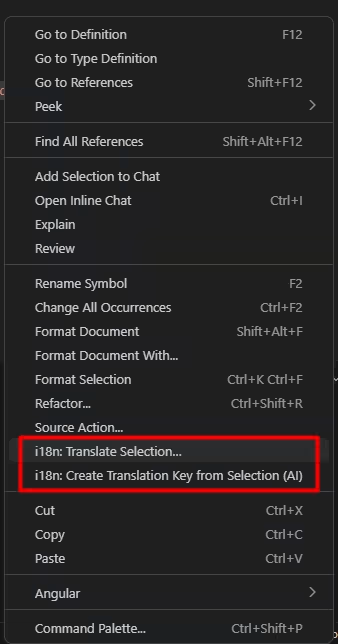
Right-click translate, straight from your code
The feature I use the most is also the newest. Two commands live on the editor's right-click menu:
i18n: Translate Selection…
Select a string literal in your component and the extension does three things at once:
-
If the selection is already an existing key path (for
example
comp.externalsTable.accessCategoryTypeNameHeader), the QuickPick clearly says so and previews every language's current value, so you don't accidentally re-create it. -
It searches by value across every language. If
"Are you sure?" already lives in
common.confirm.title, you'll be offered to reuse that key with one click. -
It also surfaces
sibling keys whose last segment matches every key ending
in
.accessCategoryTypeNameHeader, for example. Designers reuse names across screens; this stops you from duplicating the underlying string ten different ways.
Decline the suggestions and you fall into a guided create flow (key
path → source language → source value, each pre-filled where it makes
sense), with optional one-shot AI translation into every other language. The
selection in your code is then replaced with the configured
LocaleSynci18n.keyInsertTemplate by default just the bare key
path so you can wrap it with whatever helper your stack already uses.
i18n: Create Translation Key from Selection (AI)
For free-form text error messages, marketing copy, tooltips the AI command
takes the selection, looks at the existing top-level groups in your project,
and proposes a nicely-nested key path. So
"Fixed the card files uploads by removing the redundant webkit
building"
doesn't become fixedTheCardFilesUploadsByRemoving…; it becomes
something like fixes.redundantText, reusing your existing
fixes.* group when one already exists. You can edit the
suggestion before accepting it; the key is then created, translated into
every language, and inserted into your code in a single step.
Privacy, cost & offline behaviour
- No telemetry, no API keys. The extension never opens an outbound connection of its own. Translation requests go through the Language Model API to whichever provider you've authorised typically Copilot, billed under your existing subscription.
-
No vendor lock-in. If you uninstall Copilot the AI
buttons silently disappear and every other feature keeps working exactly
as it did before. You can also disable AI explicitly via the
LocaleSynci18n.aiTranslate.enabledsetting. - Your files stay yours. Edits go directly to disk in your project. There is no cloud sync, no shared workspace, nothing to sign up for.
For teams worried about data residency: the only data leaving your machine is the source string being translated and the language pair, sent through whatever channel your LM provider already uses for chat. If Copilot is approved for your codebase, this is approved for your codebase.
Who it's for (and who it isn't)
LocaleSync is built for solo developers and small teams shipping web or
desktop apps that already use plain JSON for translations the i18next, Vue
I18n, Angular $localize, React-Intl message-extraction or
"rolled our own" crowd. If your project supports a couple of languages today
and you know you'll add three more next quarter, this is the
friction-killer.
It's not a TMS. There's no glossary management, no translator assignments, no review workflow with comments and approvals. If your organisation needs that, plug LocaleSync into the dev-side and keep your TMS for the linguist-side they're complementary, not competitors.
And if you're shipping a content site rather than an app, the same attention-to-detail mindset applies on the SEO side. I keep notes on what actually moves the needle in recovering from Google Helpful Content updates and on widgets as a backlink strategy.
Frequently asked questions
Does LocaleSync work without GitHub Copilot?
Yes. Every feature except AI translation works with zero providers installed: adding keys, editing values, syncing missing keys, the right-click Translate Selection reuse-or-create flow all run locally. The ✨ buttons simply don't render until a language model provider becomes available.
Will it break my custom JSON formatting?
The extension writes JSON with a configurable indent
(LocaleSynci18n.indent, default 2) and preserves
nested vs flat structure based on what's already on disk. Non-standard
things like JSON-with-comments aren't supported because the runtime parser
doesn't read them; if your files are valid JSON, you're fine.
Can I bulk-translate hundreds of keys at once?
Yes the Auto-translate option on a new language file does exactly that, in batches of ~50 keys per AI request. A 600-key dictionary that would take many minutes one-key-at-a-time finishes in seconds, with a cancellable progress notification and a fallback path for any malformed batch reply.
Is the extension free?
Yes, MIT-licensed and free on the VS Code Marketplace. AI features consume your existing language-model subscription (Copilot or any other provider) the extension itself doesn't add a new bill.
Get LocaleSync
Install LocaleSync: i18n Data Manager from the
VS Code Marketplace, or browse the source on
GitHub. Bug reports, feature requests and pull requests are very welcome the
Translate Selection command exists because of one such
conversation.
Looking for more developer tools and snippets I use day-to-day? Browse the Code Snippets & Developer Tools library or the broader Apps & Technology section.


