

Affordable PC Builds for Streaming in 2025
When I first started streaming, I assumed I needed a high-end gaming rig that would cost a fortune. Over time, I realized that a smart, balanced configuration is far more important than chasing the most expensive components. If you want to start live streaming on platforms like Twitch or YouTube, you can absolutely do it on a budget. In this guide, I break down several affordable PC builds and laptops for streaming that offer strong performance without draining your wallet.
Each option below is designed to handle gaming and streaming simultaneously, whether you are using OBS Studio, Streamlabs, or similar broadcasting software. The key is finding the right balance between CPU performance, GPU encoding capabilities, RAM capacity, and fast storage.
PC Build #1: Budget Streaming Beast
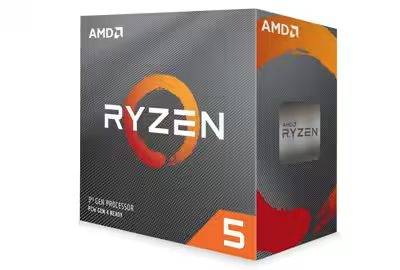
CPU: AMD Ryzen 5 3600
GPU: NVIDIA GTX 1660 Super
RAM: 16GB DDR4
Storage: 500GB SSD
Price Range: $800–$900
This is one of my favorite budget streaming PC builds. The Ryzen 5 3600 offers six cores and twelve threads, which is ideal for multitasking between gameplay and live encoding. When I configure a system like this, I rely on NVIDIA’s NVENC encoder built into the GTX 1660 Super. This allows smooth 1080p streaming while keeping CPU usage under control.
With 16GB of DDR4 RAM, I can comfortably run my game, streaming software, browser sources, alerts, and background apps without hitting memory limits. The 500GB SSD ensures fast boot times and quick game loading. For new streamers looking for performance and reliability, this build hits a very strong value-to-performance ratio.
PC Build #2: Value Streamer’s Delight
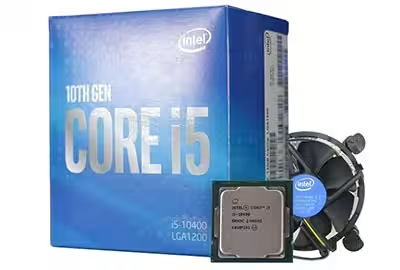
CPU: Intel Core i5-10400
GPU: AMD Radeon RX 5500 XT
RAM: 16GB DDR4
Storage: 512GB NVMe SSD
Price Range: $700–$800
If you prefer Intel-based systems, this configuration is a solid alternative. The Core i5-10400 provides excellent single-core performance for gaming and enough threads to manage streaming tasks. Combined with the RX 5500 XT, this build can handle esports titles and mid-range games at stable frame rates.
The 512GB NVMe SSD is a noticeable upgrade over standard SATA SSDs. In my experience, faster storage improves workflow efficiency, especially when managing recorded VODs, overlays, and project files. This setup is perfect for streamers who want dependable 1080p performance without pushing into premium pricing.
When building a streaming PC on a budget, I always prioritize a balanced CPU and GPU combination over flashy extras. Stability and thermals matter more than RGB lighting.
PC Build #3: Streamer’s Laptop Pick

Laptop: ASUS ROG Zephyrus G14
CPU: AMD Ryzen 9 5900HS
GPU: NVIDIA RTX 3060
RAM: 16GB DDR4
Storage: 1TB NVMe SSD
Price Range: $1,200–$1,300
If portability is important to you, a gaming laptop can be an excellent streaming solution. The ASUS ROG Zephyrus G14 combines a powerful Ryzen 9 processor with an RTX 3060, which includes a highly efficient hardware encoder for streaming.
I particularly like this laptop for creators who travel or attend events. With 16GB of RAM and a 1TB NVMe SSD, it has enough headroom for demanding games, editing software, and recorded content. While it costs more than desktop budget builds, it eliminates the need for a separate workstation.
PC Build #4: Entry-Level Streaming Setup

CPU: AMD Ryzen 3 3300X
GPU: AMD Radeon RX 560
RAM: 8GB DDR4
Storage: 256GB SSD + 1TB HDD
Price Range: $500–$600
This is a true entry-level streaming PC. I usually recommend it for beginners who are experimenting with streaming before committing to higher investments. The Ryzen 3 3300X delivers respectable quad-core performance, and the RX 560 can handle lighter games and basic streaming workloads.
That said, I strongly suggest upgrading to 16GB of RAM as soon as possible. Modern streaming software and browsers are memory-intensive. The combination of a smaller SSD for the operating system and a 1TB HDD for storage offers flexibility at a low cost.
PC Build #5: Budget Gaming Laptop for Streamers

Laptop: Acer Predator Helios 300
CPU: Intel Core i7-10750H
GPU: NVIDIA GTX 1660 Ti
RAM: 16GB DDR4
Storage: 512GB NVMe SSD
Price Range: $900–$1,000
The Acer Predator Helios 300 strikes a balance between price and performance. The i7-10750H provides strong multi-threaded capabilities, and the GTX 1660 Ti includes NVIDIA’s hardware encoder, making it suitable for smooth 1080p streaming.
I consider this laptop ideal for streamers who want solid gaming performance and portability without entering premium pricing tiers. With 16GB of RAM and fast NVMe storage, it handles most mainstream titles and streaming software configurations reliably.
Final Thoughts on Budget Streaming PCs
Starting a streaming journey does not require a $2,000 setup. What matters most is a stable CPU, a capable GPU with hardware encoding support, sufficient RAM, and fast storage. I always recommend focusing on airflow, reliable power supplies, and incremental upgrades rather than overspending upfront.
Once your hardware is ready, pair it with properly configured streaming software, optimized bitrate settings, and well-designed overlays. With the right setup and consistent effort, even a budget streaming PC can deliver professional-quality broadcasts.
Streaming success is built on consistency, personality, and smart technical decisions. The hardware options above provide a strong foundation to grow your channel without breaking the bank.


