

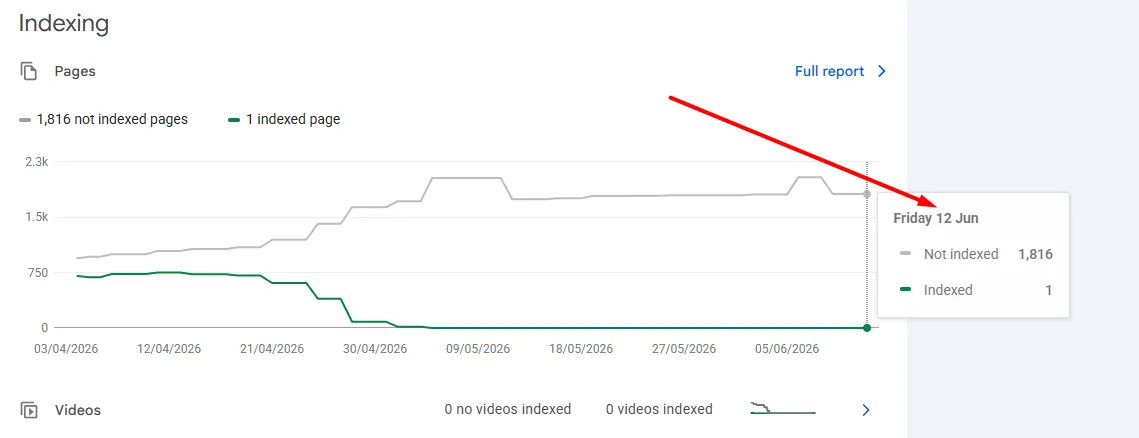
If you logged into Google Search Console this week hoping for a fresh look at your indexing status, you probably noticed something odd: the numbers haven't moved. Since June 11, 2026, the Page Indexing report has been frozen in time, and for many site owners it's now been over two weeks without a single update.
This isn't a one-off glitch on your property. It's a known, widespread issue affecting Google Search Console accounts across the board, and it's leaving webmasters, SEOs, and site owners with a frustrating blind spot right when they need clear data the most.
What exactly is going on?
The Page Indexing report in Google Search Console is normally one of the most relied-upon tools for understanding which of your pages Google has crawled, indexed, and made eligible to appear in search results. It's also where you go to diagnose why specific URLs aren't showing up. Since June 11, that report has simply stopped refreshing. Anyone checking it today is still looking at data that's over two weeks old, with no new crawl or indexing status changes reflected anywhere in the interface.
Is your site actually being indexed? Here's how to check
This is the part that matters most: this is a reporting delay, not an indexing delay. Google's underlying crawling and indexing systems are continuing to operate normally. The only thing broken is the dashboard that displays that data back to you.
If you want proof that your pages are still being crawled and indexed while the report catches up, you don't have to rely on Search Console at all. A quick and reliable way to spot-check your site's indexing status is to run a simple search operator directly on Google:
site:yourdomain.comReplace "yourdomain.com" with your own domain, run the search, and you'll see a live list of the pages Google currently has indexed for your site. If new or recently published pages show up here, that's a strong signal that indexing is still happening as expected behind the scenes, even though your Search Console report hasn't caught up yet.

This has happened before: the November - December 2025 outage
If this whole situation feels familiar, that's because it is. The Page Indexing report went through a very similar breakdown just a few months earlier. Starting around November 17 - 21, 2025, the report quietly stopped updating, and it stayed frozen for nearly a full month before Google resolved it on December 18, 2025.
That earlier outage overlapped with the December 2025 core update, which made it especially stressful for SEOs trying to separate genuine ranking shifts from a broken reporting tool. A related Performance report delay, which had ballooned to 50-70+ hour lags instead of the usual few hours, was fixed just one day before the indexing report came back, suggesting both issues traced back to the same underlying infrastructure problem on Google's end.
When that fix landed, the report jumped back to showing data from December 14, restoring the normal 2-4 day reporting lag site owners are used to. Crawling, indexing, and rankings were confirmed to have continued functioning normally the entire time, exactly as Google is saying now. Knowing that a nearly month-long precedent exists is useful context: it suggests the current delay, while frustrating, is unlikely to be permanent, even though it may take a while longer to resolve.
Step-by-step: using the URL Inspection tool as a workaround
While the site: search operator is great for a quick overview, the URL Inspection tool gives you a much more detailed, page-specific look at indexing status, and it tends to reflect more current data than the frozen aggregate report. Here's how to use it:
- Open Search Console and select the property for the site you want to check.
- Click into the search bar at the top of the page labeled "Inspect any URL in [your domain]".
- Paste the full URL of the page you want to check, including https:// and the exact path, then press Enter.
- Review the "URL is on Google" or "URL is not on Google" status at the top of the results panel. This tells you, in real time, whether Google currently has this specific page indexed.
- Expand the "Coverage" section to see details like the last crawl date, the indexing status, whether Google is following any canonical tag correctly, and whether the page is mobile-friendly.
- If the page isn't indexed and you've recently fixed an issue, click "Request Indexing" to nudge Google into re-crawling the page sooner. Keep in mind Search Console typically caps this at around 10-12 individual requests per property per day.
- Repeat for a handful of your most important URLs rather than trying to check your entire site this way, it's built for spot-checks, not bulk audits.
Because this tool queries Google's live index directly rather than pulling from the same delayed reporting pipeline as the Page Indexing report, it's currently your most reliable way to confirm whether specific pages are indexed while the aggregate report catches up.
Where the issue was first reported
The delay has been tracked closely by the SEO community since it began. One of the earliest and most detailed write-ups on the situation came from Search Engine Roundtable, which has been following the story as it developed. You can read their original coverage here.
Has Google said anything about it?
For most of the two-plus weeks this issue has been going on, Google had not issued any detailed public explanation beyond confirming, in general terms, that this affects reporting only and not actual crawling, indexing, or ranking. That left a lot of site owners checking forums daily for updates.
As of July 1, nearly three weeks into the delay, Google's Search Advocate John Mueller did acknowledge the issue directly, apologizing for the delay and noting the team is working on restoring the report to normal speed, though no fixed timeline has been given yet. So while there's now at least some official acknowledgment, a full resolution and an ETA are still pending.
We'll keep an eye on this and update this article as soon as more concrete information becomes available.
What should you do in the meantime?
- Don't panic if your Page Indexing report looks stale, it's not reflecting reality in real time right now.
-
Use the
site:yourdomain.comsearch operator to spot-check indexing on important pages. - Use the URL Inspection tool inside Search Console for page-by-page checks, it tends to reflect more current data than the aggregate report.
- Hold off on drawing conclusions or making major technical changes based solely on indexing numbers pulled during this window.
- If you're preparing client or stakeholder reports, flag that Search Console data is delayed rather than presenting frozen figures as current.
Help other site owners stay informed
If this article helped clear up some confusion, consider sharing it. A lot of site owners are seeing this same frozen report and assuming something is wrong with their own site, when in reality this is a platform-wide issue. Sharing this on X or Reddit can help more webmasters and SEOs realize this is a known, ongoing issue rather than something they need to troubleshoot on their end.


